Apache conditional websockets

If you have Apache >= 2.4 and enabled proxy_wstunnel, then this example may help to show how to redirect websockets connections to the right place. (Note that there are easier ways if you want to redirect all traffic to the websocket location. This example is for if you want to have the normal HTTP side-by-side with the websockets.)

[...]
RewriteCond %{HTTP:Upgrade} websocket [NC]
RewriteRule /(.*) ws://localhost:1234/$1 [P,L]
[...]

Search and replace in .docx using Python

A simple PoC to get you going:

#!/usr/bin/env python2
import zipfile as zf
import StringIO as si
import sys

candidates = ["word/document.xml"]

sio = si.StringIO()
with zf.ZipFile(sio, "w", compression=zf.ZIP_DEFLATED) as zio:
  with zf.ZipFile(sys.argv[1], "r") as za:
    for infile in za.namelist():
      indata = za.read(infile)
      if infile in candidates:
        indata = indata.replace("token", "replacement")
      zio.writestr(infile, indata)

with open("modified_{}".format(sys.argv[1]), "w") as oufile:
  oufile.write(sio.getvalue())

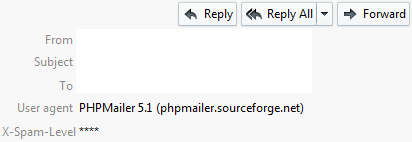
Spam level headers in Thunderbird

Spamassassin adds several special headers to every email that it scans. One of these is X-Spam-Level, that is, the degree of “spaminess” that the email scored.

thunderbird-headers

When training your spam filters, it can be useful to see the score of each scanned email. In Thunderbird, this can easily be done by changing a setting using the config editor. In the field mailnews.headers.extraExpandedHeaders add the value X-Spam-Level.

thunderbird-setextra

As a bonus, to see the user agent string, you can also use the config editor by setting mailnews.headers.showUserAgent to value true. This simple flag renders a separate plugin for this functionality superfluous.

Gmail-style email address aliases with Postfix

As some might know, Google offers alternative ways to refer to Gmail email addresses.

For example, you can use the “plus” technique to make distinctions between different organizations that you share you email address with. For instance, if you own example@gmail.com, then example+nospam still delivers to the same address. Indeed, everything after the plus symbol is ignored (Gmail is simply adhering to the standard here).

One advantage of this technique is that you can hand out different email aliases to different organizations. If you start receiving spam on any of these aliases then you can trace this back to the organization which leaked your email address to spammers.

The Postfix mail transfer agent also supports such a feature. If you set

recipient_delimiter = +

then Postfix tries to deliver to example+nospam, and if this doesn’t exist, will deliver to example.

Of course, you can change this parameter. This is especially interesting if you own the whole domain name and do not need to consider other users. Changing the parameter to a dot symbol is not a bad idea, since many web forms tend to inadvertently block out the plus symbol.

Digging deeper in EC2

If you have two VMs which are co-resident on a Xen machine then the Xenstore will play a pivotal role for the inter-VM communication. To confirm that your VMs are indeed co-resident, a simple “ping-pong” through the Xenstore is a fast verification method. It can even be done using the Xenstore tools without using the API.

To find out your domain id, xenstore-read domid will read from the the domid field in your part of the Xenstore. Your part of the Xenstore is normally under /local/domain// in the Xenstore tree, and it is not possible to read the subtrees of co-resident VMs.

However, if one of the co-resident VMs cooperates, this situation changes. For instance, the simple ping-pong becomes possible if you make your VM subtree accessible for other VMs. It turns out that there is only one field in this subtree which is not owned by domain 0 and which you can change the permissions of yourself: the data field. Hence, if you do, where <ID> is the domain ID of the first VM:

xenstore-chmod /tool/test-hugo b

Then you have shared read and write access (b is both) with all other VMs not explicitly listed. The next step is then simply to write a string there using xenstore-write and reading it using xenstore-read in the second VM. Moreover, I have used the world-readable data field extensively for creating a passtrough-encryption virtual block device.

Co-residence information leak

It is in the cloud providers interest that the cloud computing resources appear homogenous to the cloud consumers. When only looking at the Xenstore, to a certain degree this is true. It is not possible to list the /local/domain directory in the Xenstore to see which other VMs are running.

However, there is a part of the Xenstore which has not been properly closed down in all deployments of Xen in EC2. In these versions, you can list a part of the Xenstore which will reveal the Xen ID numbers of the co-resident VMs. Using the standard tools, this can be done with:

xenstore-list /local/domain/0/backend/vbd

Additionally, you can enumerate in each VM’s subdirectory to see how many Xen virtual disks they have attached (as well as the major-minor number of the disk device). The affected versions are:

  • 3.4.3-kaos_t1micro, with build timestamp: Mon May 28 23:52:08 UTC 2012
  • 3.4.3-kaos_t1micro, with build timestamp: Sat Apr 28 07:06:40 UTC 2012

Since this relates to the Xenstore daemon running in domain 0, the Xen hypervisor version as listed here should in principle be unrelated. However, the experiments in the field showed a 100% correlation of this bug exclusively to these two versions, and can thus be found to relate to how Amazon has packed their Xen packages together with their customizations. Some results that could be found using this bug are as follows.
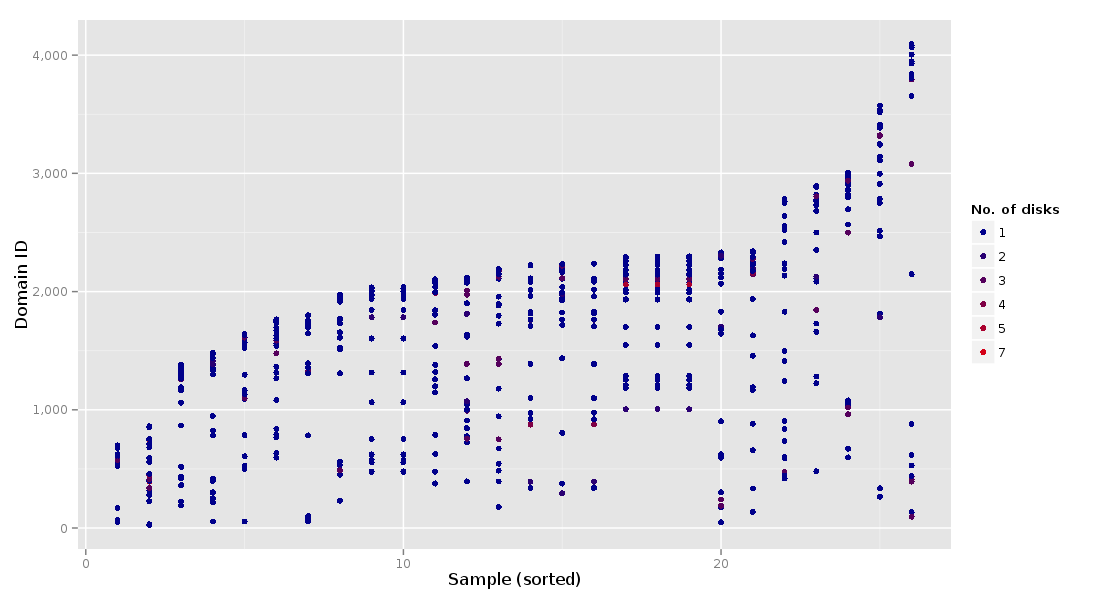
scatter plot of co-resident VMs

This plot shows who my neighbors were and how many disks they were using.
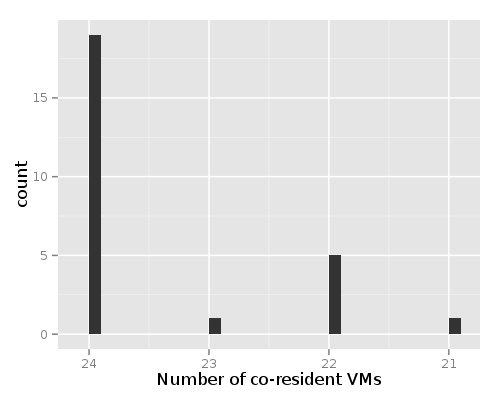
histogram of number of co-resident VMs

Furthermore, this plot shows that there are typically 24 micro instances per physical machine in EC2.
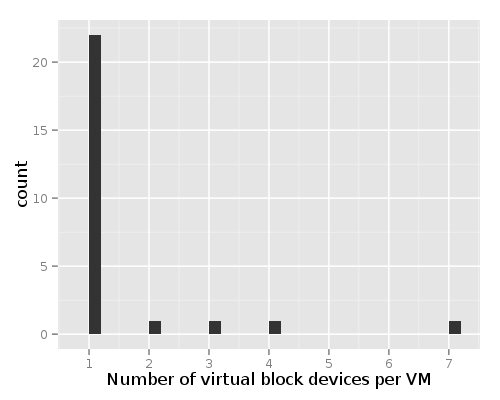
histogram of number of disks per VM

These plots belong to a sample size of 26 instances where the leak was applicable. The number of co-resident VMs is a snapshot from the moment of deployment.