Digging into Xen at EC2

During my master’s thesis I experimented with co-residence of virtual machines on the public cloud (Amazon EC2). The goal was to create a setting with co-resident VMs in which one VM offers specialized security services to another co-resident VM. Doing this in the public cloud was not academically very relevant, but a fun experiment nonetheless.

Mapping the cloud has already been done before (see Ristenpart et al.) and that Amazon leaks some information has been pointed out before. Nonetheless, there is still much more to be discovered.

Co-residence

Achieving co-residence is (of course) not endorsed by the cloud provider (in this case Amazon). The chance that two random VMs are co-resident in the cloud is very small, since the cloud consists of a huge number of physical hosts. However, if you launch n=20 VMs in a single burst (via the AWS API), there is a non-insignificant chance that at least two VMs of these are started on the same physical host.

Detecting co-residence can be done in multiple ways. For example by looking at the first hop (cf. Ristenpart et al.) or by exchanging “ping-pong” data through the Xenstore. A simple indication can be given by simply looking at the domain ID that your VMs have received. If these are sequential, then you have a good indication that these VMs might be co-resident.

Domain ID samples

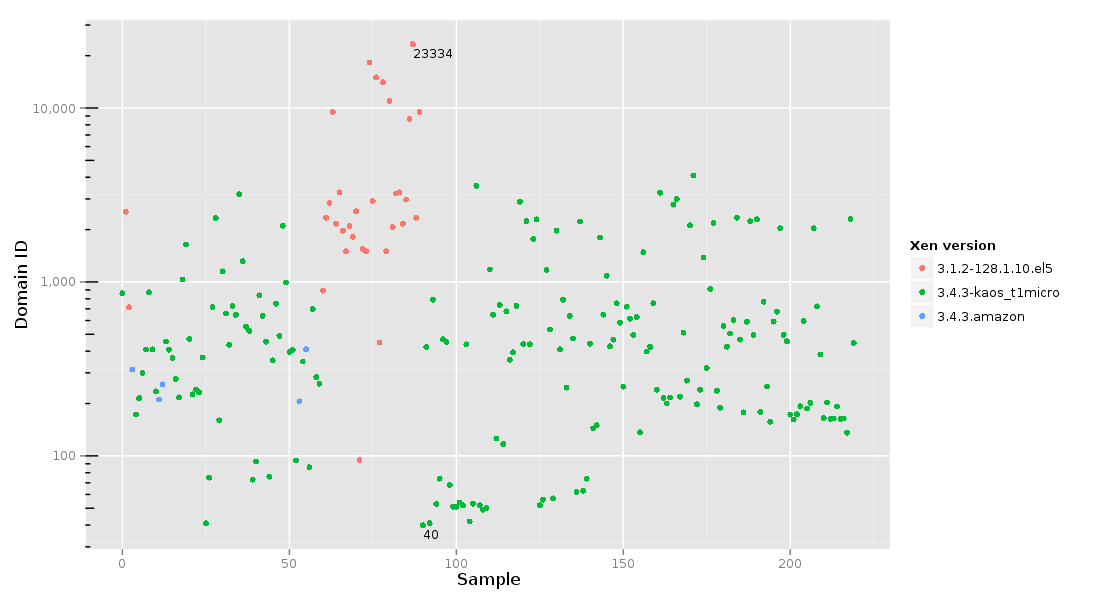
During my experiments I recorded information on all the VMs which were launched in order to get co-resident VMs. The following figure gives an overview of the domain IDs that my VMs received.
domid scatter plot
This graph conveys that the domain IDs can vary quite a lot. Also shown is the Xen hypervisor version that was running on the respective hosts.

EC2 Xen versions

I encountered at least three distinct versions of Xen hypervisors in the US East region. This information is exposed by Xen via the xen_version hypercall.

3.1.2-128.1.10.el5 3.4.3-kaos_t1micro 3.4.3.amazon
Compile date Thu Sep 2 19:09:17 SAST 2010
Tue Mar 15 19:28:19 SAST 2011
Mon Nov 21 07:15:03 SAST 2011
Fri Jun 1 17:29:43 SAST 2012
Sat Apr 28 07:06:40 UTC 2012
Mon May 28 23:52:08 UTC 2012
Mon Aug 27 08:26:20 UTC 2012
Thu Aug 24 17:00:00 UTC 2006
Compiled by amazon,
builder
mockbuild amazon
Compiler gcc version 4.1.1 20070105 (Red Hat 4.1.1-52) gcc version 4.1.2 20080704 (Red Hat 4.1.2-48) amazon_cc
Compile domain ec2.internal (none) amazon.com
Domain-ID Median 2438 424 258

From this information, we can infer a few observations.

  • The variety in versions that are used seems to indicate that Amazon does not have an automated hypervisor updating scheme. This immediately raises the concern whether Amazon can patch running hypervisors against publicized vulnerabilities. It seems more likely that, unless they hotpatch their hypervisors, Amazon is running (vulnerable) outdated hypervisors on some of their machines.
  • The version listed in the first column (3.1.2) lists its timestamps in South African timezones. This is a clear correlation with the fact that Amazon EC2 has its roots in South Africa.
  • It has been noted before that Amazon is likely using Red Hat, and the above table shows (in the GCC strings) that the Xen packages are compiled on a Red Hat machine.
  • Mockbuild (listed in column two) is a Red Hat tool typically used for building RPMs, giving additional indication that Dom0 must be running a Red Hat based Linux, too.
  • In the third column we see a misleading compilation timestamp (3.4 was not out yet in 2006). All the compilation metadata for this version seems to indicate that Amazon is using a custom compilation toolchain now.

Up next: learning more from the hypervisor and the Xenstore.

These 220 measurements were taken throughout November 2012 on Amazon EC2 US-East region. All instances were micro instances.
TikZ node positioning

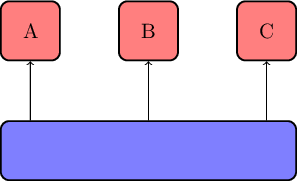
Drawing nodes in TikZ above each other can be tricky. For example, if you want to draw several nodes above another node in an aligned way.

One way to achieve this is as follows.

\node[minimum width=5cm] (basis) {};
\node[above=of basis.north west, anchor=south west] (a) {A};
\node[above=of basis] (b) {B};
\node[above=of basis.north east, anchor=south east] (c) {C};

nodepos

In this way, the left border of A and the right border of B do not extend beyond the basis node. Note that you need to have the positioning TikZ libary loaded.

To draw the edges in a vertical fashion, use the intersection shorthand for the nonstandard nodes:

\draw[->] (basis.north -| a) -- (a);
\draw[->] (basis) -- (b);
\draw[->] (basis.north -| c) -- (c);

TikZ node connector

In the series of TikZ tips, today we look at connectors between nodes.

TikZ comes with a variety of line types between nodes, such as straight, curved, and right-angled. In particular the last one, right-angled lines, can be very useful in diagrams. Right-angled lines are usually more appealing than direct point-to-point straight lines in diagrams.

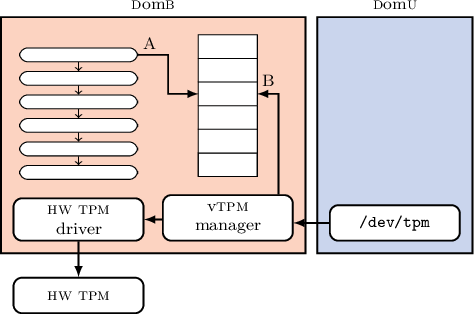
Placing right-angled lines in diagrams in a visually appealing way is not always easy, however. Consider for example this diagram in which a chain of nodes have an outgoing arrow into an array.

connector needed

In this figure, the line marked B is well-suited for a right-angled line. On the other hand, the line marked with A is less-suited, since it needs two bends. For the ease of use, try using the following two macros for horizontal or vertical lines.

\newcommand*{\connectorH}[4][]{
  \draw[#1] (#3) -| ($(#3) !#2! (#4)$) |- (#4);
}
\newcommand*{\connectorV}[4][]{
  \draw[#1] (#3) |- ($(#3) !#2! (#4)$) -| (#4);
}

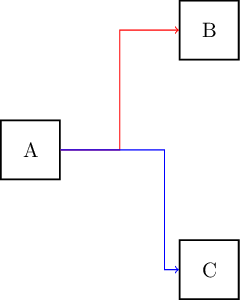
You can then use macros by specifying a value between 0 and 1 (where to ‘break’) and the source and destination node. For instance

\connectorH[->, red]{0.50}{a}{b}
\connectorH[->, blue]{0.75}{a}{c}

Results in:

connector

Note that you need to have the calc TikZ libary loaded.

Disabling Office 2010 shared folder synchronization in a simple way

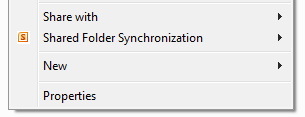
There are various posts on how to remove the Office 2010 “Shared Folder Synchronization” context menu using either the Windows registry modifications or the Office uninstaller. I prefer a cleaner solution which seems hard to find at Google, so it’s worthwhile mentioning it here.

Steps

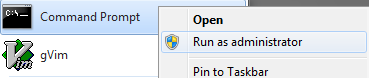
The approach is to unload the DLL in question. The first step is to start a command prompt as administrator.

In this command prompt, type (assuming 64-bits Office — see comments for details):

regsvr32 /u "C:\Program Files\Microsoft Office\Office14\GROOVEEX.DLL"

Pasting is not good enough, since the command prompt will not swallow the quotes. Therefore, type it, or repair the line with the up-arrow after pasting. An example of how it looks like:

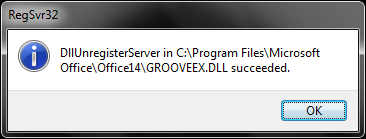
After executing the command, a dialog will inform you of the result. If you get an error, double check whether you opened the command prompt as administrator correctly.

Reloading

Reloading can always be done by calling regsvr32 as shown above, but without the /u flag.

(Aside: in Office 2007 this feature was called Groove folder synchronization.)

Multi-hop X-forwarding over SSH

Sometimes you’d like to do X-forwarding over multiple hops. For instance:

Home ↔ Office gateway ↔ Office machine.

One way to automate this is with this Bash function:

sshx () {
        [ -z "$2" ] && return
        sudo ssh -Nn $1 -L 2200:$2:22 &
        sleep 1s
        PID=$!
        ssh localhost -XYC -p2200
        sudo kill $PID
}

Choose a random localhost port number; 2200 is merely an example here.

Then invoke with:

$ sshx passthrough_server destination_server

Since the snippet relies on Bash forking, it assumes you have set up SSH for public key based authentication with the passthrough server, and it will not ask for a password. Because SSH requires root privileges on your local machine to set up the port forwarding, your ~/.ssh/authorized_keys on the passthrough server must contains the public key of root from your local machine.